Troubleshooting: Common Faults & Quick Fixes For Brushed 21V Ratchet Wrench
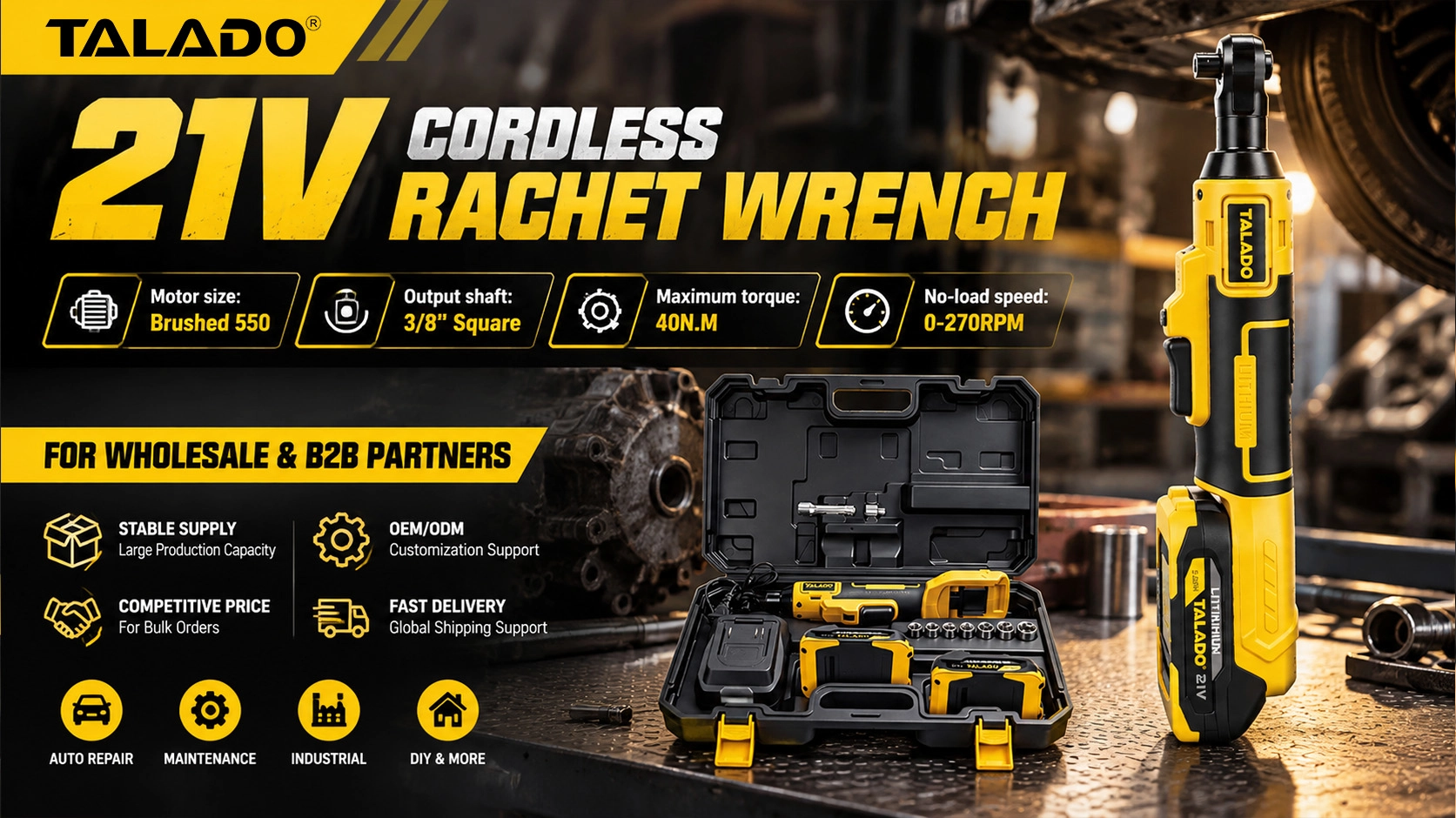
Our 21V brushed cordless ratchet wrench (Model ML-W015) delivers 40N.M max torque with a no-load speed of 0-270RPM, equipped with 3/8" & 1/2" square drive options. Compact and lightweight, it is widely used for narrow-space fastening work in auto repair, equipment installation and factory maintenance.
Even with solid build quality, improper operation or long-time heavy use may lead to occasional faults. Below we list frequent issues, root cause analysis and easy DIY fixes.
🔋 Issue 1: Wrench Will Not Power On / No Response
Symptom: Press the trigger, the tool stays dead; LED light does not turn on.
Likely Causes:
Battery insufficient charge, loose battery lock, oxidized/dirty contact terminals, defective battery pack.
✅ Step-by-step fixes:
- Remove the lithium battery and re-seat it firmly until you hear the locking click. A loose fit cuts off the power circuit.
- Charge the battery fully using our original matching charger. Never mix with incompatible third-party chargersUse a dry lint-free cloth to wipe the metal contact tabs on both the battery and the wrench body, clearing grease, dust and oxide layers.
- Cross-test with a spare fully charged battery. This helps you quickly confirm whether the fault lies with the battery or the main tool.💡 Pro Tip for Distributors: This is the #1 after-sales complaint from end users. Guide customers to test battery contact first before opening returns.
⚙️ Issue 2: Weak Torque, Slow Spin, Poor Fastening Strength
Symptom: The ratchet runs, but struggles to tighten or loosen bolts; output power drops noticeably under load.
Likely Causes: Low battery voltage, metal shavings jammed in drive head, worn carbon brushes inside the 550 brushed motor.
✅ Step-by-step fixes:
- Low battery charge is the primary culprit. Lithium-ion packs sag in voltage when drained, which directly reduces torque output under load. Recharge before high-torque work.
- Remove the socket from the square drive. Brush away metal chips and grime trapped inside the drive cavity. Add a tiny amount of light lubricating grease to the rotating joint.
- Brushed motors rely on carbon brushes for power transfer. After extended hours of use, worn brushes lead to power loss. Replace matching carbon brushes once performance declines.
🔊 Issue 3: Unusual Grinding, Scraping or Clicking Noise During Operation
Symptom: The wrench runs, but emits strange harsh sounds that were not present when new.
Likely Causes: Foreign debris trapped in ratchet pawls, dry gears without lubrication, premature gear wear or tooth damage.
✅ Step-by-step fixes:
- Stop using the tool right away. Continued running can crack gear teeth and create costly permanent damage.
- Carefully take apart the ratchet head housing. Thoroughly clean all metal fragments and dirt from the gear and pawl assembly.
- Apply high-temperature gear grease evenly on all moving meshing surfaces.
- If abnormal noise persists after cleaning and lubrication: the internal gear set may be damaged. Advise users to stop operation and source original replacement parts.
💡 Issue 4: Built-in LED Work Light Fails to Illuminate
Symptom: The ratchet wrench spins normally when triggered, but the auxiliary LED light does not turn on.
Likely Causes: Loose internal wiring connector, dust blocking the lamp window, failed LED module.
✅ Step-by-step fixes:
- Reinstall the battery first. Shared power terminals mean poor contact can disable the light separately from the motor.
- Wipe clear the transparent LED cover to remove thick dust or paint splatters that block brightness.
- If the motor works fine while the light remains off, the LED assembly is faulty. Reach out to our support team for genuine replacement components.
🌡️ Issue 5: Rapid Overheating After Short Operating Time
Symptom: The tool body and motor housing get hot quickly; trigger run time becomes very short.
Likely Causes: Continuous overload operation, blocked cooling vents, forced manual overloading beyond rated torque limit.
✅ Step-by-step fixes:
- This ratchet wrench is designed for intermittent fastening work. Long non-stop running overtaxes the brushed motor. Schedule cooling breaks between cycles.
- Keep motor ventilation openings clean. Blow out accumulated dust regularly to preserve heat dissipation.
- Do not apply extra leverage by hand on the tool head. Artificial overload will burn out the 550 motor winding permanently.
🛠️ Long-Term Preventive Maintenance Checklist
Good routine care drastically cuts down fault rates and extends tool lifespan — great content you can share with your retail customers:
✅ Clean the ratchet head and battery contacts after every heavy-duty job
✅ Store batteries and tools indoors in cool, dry conditions; avoid rain and high humidity
✅ Only use standard, undamaged matching sockets. Deformed sockets damage the square drive and gears
✅ Avoid dropping, striking or rough impact: internal ratchet gears are precision parts
✅ Inspect carbon brushes periodically for heavy-use fleets
📞 Need Further Support?
If you follow all troubleshooting steps above and the malfunction remains unresolved, get in touch with your authorized distributor or our after-sales support team.
We supply original spare parts, bulk technical guidance and wholesale after-sales service for all TALADO power tool partners.